TOY simulator
TOY machine
The TOY machine, as described and explained by Sedgewick and Wayne, is an imaginary machine to help better understand how computers operate.
It consits of three main components: main memory, registers and program counter (short: pc).
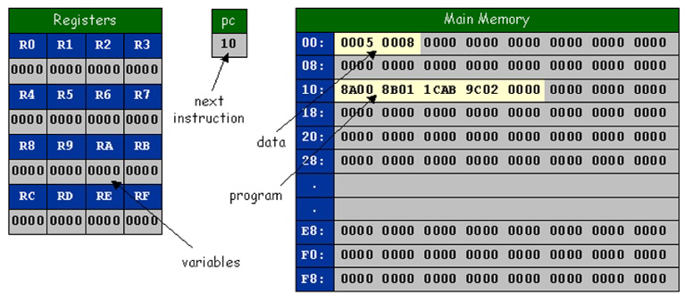
The main memory can hold up to 256 words (adresses range from 00 to FF). A word is a 16-bit hexadecimal integer which will be interpreted using two’s complement (so, we can represent any integer in the range of -32.768 to 32.767).
However, there are only 16 registers (0 to F). A register is similar to the main memory, they can each hold a 16-bit integer and can be viewed as “variables” that we can use in our program.
Instructions
To run the machine, we first must load our instructions into the main memory (i.e. by reading them from a file). Then, starting at pc = 0x10, we load the current instruction and compute the result. Then, we increment the program counter and load the next instruction and we keep executing instruction until we encounter a halt instruction (0x0000).
The TOY machine instruction set architecture (short: ISA) has a total of 16 instructions. An instruction consists of an opcode (0 to F) that describes the exact behavior of the instruction. Below is the full set and descriptions of the instructions.
| OPCODE | DESCRIPTION | FORMAT | PSEUDOCODE |
|---|---|---|---|
| 0 | halt | - | exit |
| 1 | add | 1 | R[D] <- R[S] + R[T] |
| 2 | subtract | 1 | R[D] <- R[S] - R[T] |
| 3 | and | 1 | R[D] <- R[S] & R[T] |
| 4 | xor | 1 | R[D] <- R[S] ^ R[T] |
| 5 | left shift | 1 | R[D] <- R[S] << R[T] |
| 6 | right shift | 1 | R[D] <- R[S] >> R[T] |
| 7 | load address | 2 | R[D] <- addr |
| 8 | load | 2 | R[D] <- mem[addr] |
| 9 | store | 2 | mem[addr] <- R[D] |
| A | load indirect | 1 | R[D] <- mem[R[T]] |
| B | store indirect | 1 | mem[R[T]] <- R[D] |
| C | branch zero | 2 | if (R[D] == 0) pc <- addr |
| D | branch positive | 2 | if (R[D] > 0) pc <- addr |
| E | jump register | - | pc <- R[D] |
| F | jump and link | 2 | R[D] <- pc; |
Each opcode has a specific format:

Writing programs
To run programs on the simulator, we must declare the instructions somewhere somehow.
As like the original TOY simulator, I decided to load the instructions from a file and follow the same syntax:
// This is a comment and will be ignored

// add.toy
// Input: Stored in memory location 00 and 01
// Output: Sum of two integers saved in memory location 02
// https://www.comscigate.com/cs/IntroSedgewick/50machine/54programming/add.toy

00: 0008 8
01: 0005 5

10: 8A00 R[A] <- mem[00]
11: 8B01 R[B] <- mem[01]
12: 1CAB R[C] <- R[A] + R[B]
13: 9C02 mem[02] <- R[C]
14: 0000 halt
Let’s have a closer look:
10: 8A00 R[A] <- mem[00]
This line will load the instruction 0x8A00 into mem[10], the “comments” after the actual instruction are ignored as well and any lines that don’t follow that syntax are ignored.
Simulator
Now, let’s see how we can implement a TOY simulator. First, let’s define our TOY simulator: we need to keep track of our main memory, our registers and the program counter.
pub struct Toy {
    pc: u8, // 8-bit unsigned integer for the program counter
    registers: [i16; 16], // 16-bit signed integers (uses two's complement)
    memory: [i16; 256],
}
To instantiate a new TOY simulator, let’s add a helper function:
impl Toy {
    pub fn new() -> Self {
        Self {
            pc: 0x10, // the program counter starts at 0x10
            registers: [0x0000; 16], // we fill the main memory and
            memory: [0x0000; 256]    // registers with 0x0000
        }
    }
}
To load the instructions from a file we’ll add another function that takes a path to a file, parses that file line by line and loads the instructions into the main memory:
/// ...
    pub fn read_from_file(&mut self, path: &str) {
        /// ...
    }
/// ...
Finally, when we have loaded all instructions, we need to actually run and simulate the instructions
/// ...
    pub fn simulate(&mut self) {
        loop {
            // Load the next instruction
            let inst = self.memory[self.pc as usize];

            // Increase the program counter (we want overflow to wrap the value)
            self.pc = self.pc.wrapping_add(1);

            // Extract the opcode and addresses
            let op = OpCode::new((inst >> 12) & 15);
            let d = ((inst >> 8) & 15) as usize;
            let s = ((inst >> 4) & 15) as usize;
            let t = (inst & 15) as usize;
            let addr = (inst & 255) as usize;

            // Compute the result based on the opcode
            match op {
                /// ...
            }

        }
    }
/// ...
To match the opcode and better readability, we’ll use an OpCode enum
#[derive(PartialEq)]
pub enum OpCode {
    Halt,
    Add,
    /// ...
    JumpRegister,
    JumpAndLink,
}

impl OpCode {
    pub fn new(op: i16) -> Self {
        match op {
            0 => Self::Halt,
            1 => Self::Add,
            /// ...
            14 => Self::JumpRegister,
            15 => Self::JumpAndLink,
            _ => unreachable!()
        }
    }
}
You can view the entire code and take a look at some examples on GitHub.
Conclusion
TOY machine is a great introduction to computer architecture, machine instructions, data types, … The simple instruction set makes it easy to implement your own version of the simulator. Some of the aspects of the simulator were not covered here (mainly I/O). For a more detailed description and explanation, FAQ, exercises as well as a Java implementation of the TOY simulator, check out the course material from Sedgewick and Wayne.